The Guide to Mandatory Edge-to-Edge in Jetpack Compose
By @huyhunhngc
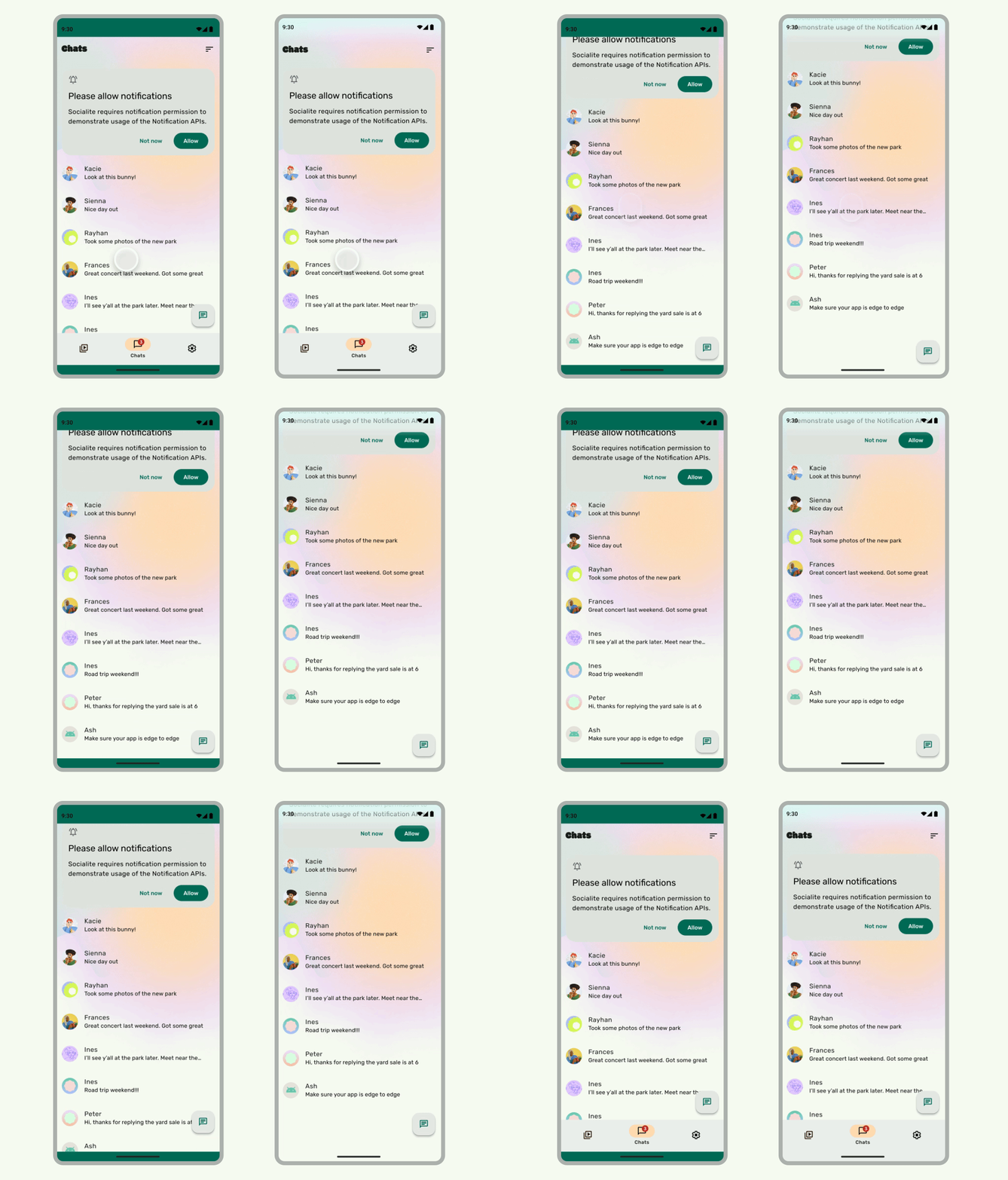 Figure 1: Left. An app that isn't edge-to-edge. Right. An app that is edge-to-edge. (Source: Android Developer)
Starting with Android 16 (API 36), an edge-to-edge display is no longer optional. The opt-out mechanism is gone, and apps are expected to draw behind the system bars by default. If your app isn't prepared, its UI will break, especially on Android 15 and newer.
This guide combines the "why" of this mandatory change with the "how" of implementing a robust solution using Jetpack Compose's WindowInsets API.
1. The Problem: Edge-to-Edge is Now Mandatory
The old fallback mechanism is now completely ignored:
android:windowOptOutEdgeToEdgeEnforcement="true"
This forces all apps into an edge-to-edge state. If your UI wasn't built with this in mind, you will encounter serious issues:
- Content Obscured: Buttons, text, and other critical elements will be hidden under the status and navigation bars.
- Incorrect Insets: The on-screen keyboard (IME) will overlap input fields, and bottom bars may appear to float incorrectly.
- Inconsistent Layouts: Screens will have inconsistent padding, with some appearing broken while others look fine.
- Hardcoded Spacing Fails: Static padding values like
16.dpare no longer reliable and will cause layout failures.
2. The First Step: Enabling Edge-to-Edge and Deprecating Accompanist
Your first action is to properly enable edge-to-edge drawing in your Activity and remove outdated libraries.
Enable with the Official API
In your Activity's onCreate method, use the enableEdgeToEdge() helper function.
import androidx.activity.ComponentActivity
import androidx.activity.enableEdgeToEdge

class MyActivity : ComponentActivity() {
    override fun onCreate(savedInstanceState: Bundle?) {
        // This is the new, official way to enable edge-to-edge.
        enableEdgeToEdge()

        super.onCreate(savedInstanceState)
        setContent {
            // Your Compose content
        }
    }
}
Stop Using Accompanist's SystemUiController
The Accompanist SystemUiController is now deprecated. The enableEdgeToEdge() function and the modern WindowInsets API in Compose are its official replacements.
The Old Way (Deprecated):
// DO NOT use this anymore. This is the legacy approach.
val systemUiController = rememberSystemUiController()
SideEffect {
    systemUiController.setSystemBarsColor(
        color = Color.Transparent,
        isNavigationBarContrastEnforced = false
    )
}
3. Using Scaffold: The Right Way
The Scaffold composable is the primary tool for handling insets. It automatically calculates padding for system bars and its own components (like TopAppBar).
Scaffold(
    topBar = { TopAppBar(...) }
) { innerPadding ->
    // Apply the padding provided by Scaffold to your content's container.
    LazyColumn(
        modifier = Modifier.padding(innerPadding)
    ) {
        // List content
    }
}
⚠️ A Common Pitfall: Scaffold with a bottomBar
Be careful when using a Scaffold with a bottomBar. The returned innerPadding value includes the height of both the system navigation bar and your app's bottomBar.
If you apply this innerPadding directly to your screen's content, you will get extra, unwanted space at the bottom.
The Better Approach: A Single, Top-Level Scaffold
Instead of wrapping each screen in a Scaffold, wrap your entire NavHost in a single Scaffold. This centralizes inset management and avoids the double-padding issue.
Scaffold(
    bottomBar = { MyBottomBar(...) }
) { innerPadding ->
    NavHost(
        navController = navController,
        startDestination = "home",
        // Apply only the bottom padding from the Scaffold to the NavHost.
        // This pushes the NavHost content above the bottom bar without adding extra space.
        modifier = Modifier.padding(bottom = innerPadding.calculateBottomPadding())
    ) {
        // Your composable destinations
    }
}
4. Granular Control with WindowInsets Modifiers
For layouts without a Scaffold or when you need finer control, use the WindowInsets modifiers directly.
WindowInsets.safeDrawing: The recommended inset for most content. It represents all areas where system UI could potentially obscure your content (system bars, IME, display cutouts).Modifier.safeDrawingPadding(): A convenient shortcut to apply padding for thesafeDrawinginsets.Modifier.windowInsetsPadding(insets): Applies padding for a specific inset, likeWindowInsets.navigationBarsorWindowInsets.ime.Modifier.consumeWindowInsets(insets): Prevents child composables from receiving and applying the same inset padding again. This is crucial for nested layouts.
Column(
    modifier = Modifier
        // Apply padding for system bars at the parent level
        .windowInsetsPadding(WindowInsets.systemBars)
        // Consume the insets so children don't apply them again
        .consumeWindowInsets(WindowInsets.systemBars)
) {
    // Child composables here will not get extra padding.
}
5. Updating Legacy Components
The mandatory edge-to-edge change also affects older components.
- Replace
ModalBottomSheetLayout: This Accompanist component is outdated and can have visual bugs with insets. Migrate to Material 3'sBottomSheetScaffold, which correctly handles insets and gestures.
6. A Practical Migration Strategy
If you have a large codebase, a full rewrite might be risky. Consider a staged approach.
-
Phase 1: Quick Fix
- Patch the screens that are most visibly broken.
- Wrap them in a
Scaffoldand correctly applyinnerPadding. - Ensure the nav bar contrast is handled correctly via
enableEdgeToEdge.
-
Phase 2: Clean Migration
- Refactor to a top-level
Scaffoldaround yourNavHost. - Replace all instances of
ModalBottomSheetLayoutwithBottomSheetScaffold. - Remove all hardcoded padding values and rely on the
WindowInsetsAPI. - Thoroughly test edge cases: keyboard interactions, split-screen mode, dark mode, and gesture navigation.
- Refactor to a top-level
7. Guidelines for Future Development
- Always use
Scaffoldas your primary layout root. - Avoid nested
Scaffolds. Use one top-levelScaffoldto manage global UI elements. - Pass
innerPaddingfromScaffold. Never hardcode padding to avoid system UI. - Use
BottomSheetScaffoldfor all bottom sheets. - Ensure design system components respect insets. If you use custom components, they must be aware of and react to
WindowInsets.